
인턴기록지
[Druid] 에서 postgreSQL로 ingestion Spec json코드 on Docker 본문
ewl_events_log 테이블의 데이터를 한꺼번에 넣기는 실패해서 나눠서 넣어야 한다. 년도 별로 넣어주자
{
    "type" : "index_parallel",
    "spec" : {
      "dataSchema" : {
        "dataSource" : "init_events_log",
        "timestampSpec": {
          "column": "event_time",
          "format": "auto"
        },
        "dimensionsSpec": {
          "dimensionExclusions": [],
          "dimensions": [
            "bcycl_no",
            "station_no",
            "event_type",
            "cleansing_done",
            "cleansing_result",
            "last_update_time"
          ]
        },
        "metricsSpec": [],
        "granularitySpec": {
          "type": "uniform",
          "segmentGranularity": "month",
          "queryGranularity": {
            "type": "none"
          },
          "rollup" : false
        }
      },
      "ioConfig" : {
        "type" : "index_parallel",
        "inputSource": {
          "type": "sql",
          "database": {
            "type": "postgresql",
            "connectorConfig": {
              "connectURI": "jdbc:postgresql://211.***.***.**:55432/dt_test_update",
              "user": "postgres",
              "password": "****"
            }
          },
          "sqls" : ["SELECT event_time, bcycl_no, statn_no, event_type, cleansing_done, cleansing_result, cast(last_update_time as varchar) FROM public.ewl_events_log where extract(YEAR FROM event_time) = '2020'"]
        },
        "appendToExisting" : false
      },
      "tuningConfig" : {
        "type" : "index_parallel",
        "maxRowsPerSegment" : 5000000,
        "maxRowsInMemory" : 5000000
      }
    }
  }

매달 데이터를 풀 해오니까 pull_time이후의 데이터들을 가져와주기 위해 sql문을 작성해 ingestion 해주자
{
  "type" : "index_parallel",
  "spec" : {
    "dataSchema" : {
      "dataSource" : "events_log2",
      "timestampSpec": {
        "column": "event_time",
        "format": "auto"
      },
      "dimensionsSpec": {
        "dimensionExclusions": [],
        "dimensions": [
          "bcycl_no",
          "station_no",
          "event_type",
          "cleansing_done",
          "cleansing_result",
          "last_update_time"
        ]
      },
      "metricsSpec": [],
      "granularitySpec": {
        "type": "uniform",
        "segmentGranularity": "month",
        "queryGranularity": {
          "type": "none"
        },
        "rollup" : false
      }
    },
    "ioConfig" : {
      "type" : "index_parallel",
      "inputSource": {
        "type": "sql",
        "database": {
          "type": "postgresql",
          "connectorConfig": {
            "connectURI": "jdbc:postgresql://211.***.***.**:55432/ewl_hk",
            "user": "hklee",
            "password": "****"
          }
        },
        "sqls" : ["SELECT event_time, bcycl_no, station_no, event_type, cleansing_done, cleansing_result, last_update_time FROM public.ewl_events_log WHERE event_time >= (select pull_time - INTERVAL '40' MINUTE FROM public.ewl_pulllog LIMIT 1)"]
      },
      "appendToExisting" : false
    },
    "tuningConfig" : {
      "type" : "index_parallel",
      "maxRowsPerSegment" : 5000000,
      "maxRowsInMemory" : 5000000
    }
  }
}
위와 같이 dimesions와 sql문의 컬럼 명들의 순서를 맞춰주었다. (혹시나해서,,,)
sdladmin@sdl-trainer:~/apache-druid-0.20.0-src/examples/quickstart/tutorial$ python3 post-index-task-main.py --file events_log-index.json
Beginning indexing data for events_log2
<class 'str'>
<urllib.request.Request object at 0x7f1425513f60>
Task started: index_parallel_events_log2_mcbfnnio_2020-11-30T11:56:57.265Z
Task log:     http://localhost:8081/druid/indexer/v1/task/index_parallel_events_log2_mcbfnnio_2020-11-30T11:56:57.265Z/log
Task status:  http://localhost:8081/druid/indexer/v1/task/index_parallel_events_log2_mcbfnnio_2020-11-30T11:56:57.265Z/status
Task index_parallel_events_log2_mcbfnnio_2020-11-30T11:56:57.265Z still running...
Task index_parallel_events_log2_mcbfnnio_2020-11-30T11:56:57.265Z still running...
Task finished with status: SUCCESS
Completed indexing data for events_log2. Now loading indexed data onto the cluster...
events_log2 is 0.0% finished loading...
events_log2 is 0.0% finished loading...
events_log2 is 0.0% finished loading...
events_log2 is 0.0% finished loading...
events_log2 is 0.0% finished loading...
events_log2 is 0.0% finished loading...
events_log2 loading complete! You may now query your data
성공! 데이터를 확인해보자~!

잉? last_update_time 이 timestamp형식인데 이상한 숫자로 들어가있다.
처음에 dimensionsSpec 에서 컬럼들을 설정해 줄 때 timestamp로 type을 주지 못한다.
druid.apache.org/docs/latest/tutorials/tutorial-ingestion-spec.html#rollup
Tutorial: Writing an ingestion spec · Apache Druid
druid.apache.org/docs/latest/querying/sql.html#data-types
SQL · Apache Druid
이 링크를 보면 dimensionsSpec에서 지정해 줄 수 있는 type은 String, long, double, float 이 4개밖에 없다.
sql문 쿼리에서는 다양한 sql type을 사용 할 수 있지만 spec 에서는 아직 저런 다양한 data type들을 지원해 주지 않는다.
따라서 데이터베이스에서 last_update_time을 timestamp로 불러와도 드루이드에 들어갈 때는 타입이 바뀐다. 그래서 저렇게 이상한 숫자들로 들어가는 것 같다.
그래서 sql문의 last_update_time을 string 으로 변환해 보았다.
"sqls" : ["SELECT event_time, bcycl_no, station_no, event_type, cleansing_done, cleansing_result, cast(last_update_time as varchar) FROM public.ewl_events_log WHERE event_time >= (select pull_time - INTERVAL '40' MINUTE FROM public.ewl_pulllog LIMIT 1)"]
보기에는 이게 더 편하다.
드루이드 sql 창에서 cast(last_update_time as timestamp)로 해보면
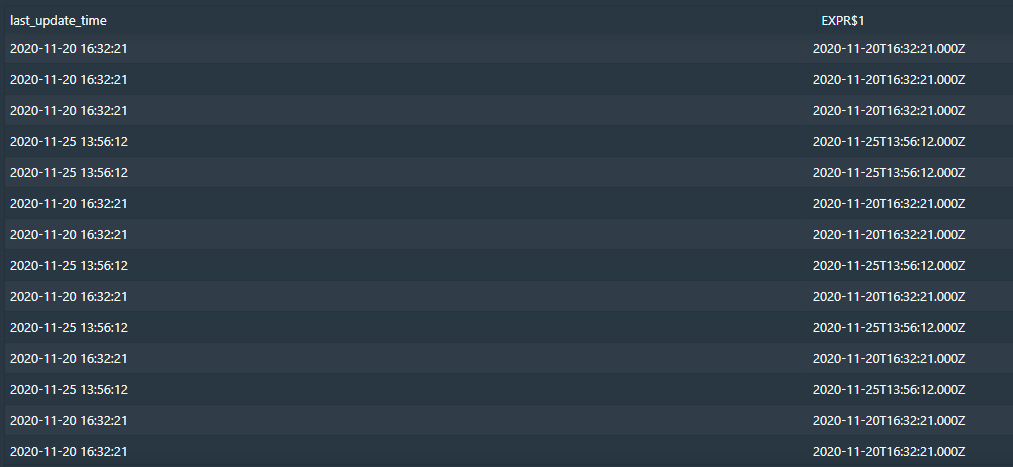
아까 이상하던 숫자도 string 타입인 last_update_time도 저렇게 타임스탬프 형식으로 잘 나오는 것을 볼 수 있다.
즉, 디비에서 꺼내서 넣었을 때는 timestamp 형식으로 넣지를 못하지만 드루이드에서 형변환해 사용한다면 잘 이용할 수 있을 것 같다 !
'Druid > Project' 카테고리의 다른 글
| [Druid] SQL ingestion spec - postgresql (postgresql database data) on docker (0) | 2020.11.26 |
|---|---|
| [Druid] post-index-task-main.py 수정 (최종본!) (0) | 2020.11.26 |
| [Druid] 400만개 데이터 ingestion (csv spec) (0) | 2020.11.26 |
| [Druid] ingestion spec for csv file (csv 파일로 ingestion) (0) | 2020.11.26 |
| (인터넷연결없이) jdk8 & druid install (0) | 2020.09.24 |

