
인턴기록지
[Druid] Writing an ingestion spec - rollup이 되지않은 data 본문
csv 파일을 python에서 json파일로 변환해 주었다 (파일이름: 100_history.txt, 최신 100개의 row만 존재)
import csv
import json

input_file_name = "./0_history.csv"
output_file_name = "./0_history.txt"

with open(input_file_name, "r", encoding="utf-8", newline="") as input_file, \
        open(output_file_name, "w", encoding="utf-8", newline="") as output_file:

    reader = csv.reader(input_file)

    # 첫 줄은 col_names 리스트로 읽어 놓고
    col_names = next(reader)

    # 그 다음 줄부터 zip으로 묶어서 json으로 dumps
    for cols in reader:
        doc = {col_name: col for col_name, col in zip(col_names, cols)}
        print(json.dumps(doc, ensure_ascii=False), file=output_file)
데이터 파일을 드루이드에 ingestion해주기 위해 필요한 json형식 파일을 작성해보았다.
1. rollup이 되지않은 data
{
    "type" : "index_parallel",
    "spec" : {
        "dataSchema" : {
            "dataSource" : "100_history_made", //ingestion했을 때 데이터소스이름
            "timestampSpec" : {		// 타임스탬프로 쓸 컬럼 지정
                "column" : "rental_date",
                "format" : "iso"
            },
            "dimensionsSpec" : { //dimension안의 컬럼명들의 기본값은 string. 다른 type의 컬럼은 타입을 정해줌(long, float, double, string)
                "dimensions" : [
                    "bike_id",
                    "user_id",
                    "station_rental_id",
                    "return_date",
                    "station_return_id",
                    { "type":"long","name": "usage_time"},
                    { "type":"long","name": "distance"},
                    { "type":"long","name": "daytype"},
                    "mileage",
                    "holiday",
                    "holiday2",
                    "bike_type"
                ]
            },
            "metricsSpec" :[],//metric스펙안에 뭐가 있으면 rollup=true, false라면 다 dimension안으로
            "granularitySpec" : { //type 이 2가지  uniform- 모든 세그먼트의 간격 크기가 균일, arbitrary- 다 각기 제각각
                "type" : "uniform",
                "segmentGranularity" : "minute",
                "queryGranularity" : "week",
                "rollup" : false
            }
        },
        "ioConfig" : {
            "type":"index_parallel",
            "inputSource" : {
                "type":"local",
                "baseDir":"quickstart/tutorial", //데이터 파일 경로
                "filter":"100_history.txt" //데이터 파일 이름- json형식으로 데이터가 들어가 있음
            },
            "inputFormat" : {
                "type" : "json" // csv 지원 함 : findColumnsFromHeader를 true로 설정해주면 ㅇ
            },
            "appendToExisting":false
        }
    }
}
apache druid 폴더안에서 명령어 실행해서 자동으로 ingestion 실행
curl -X 'POST' -H 'Content-Type:application/json' -d @quickstart/tutorial/100-index.json [http://localhost:8081/druid/indexer/v1/task](http://localhost:8081/druid/indexer/v1/task)
#커맨드 결과
{"task":"index_parallel_100_history_made_olnfoced_2020-09-17T00:57:11.920Z"}


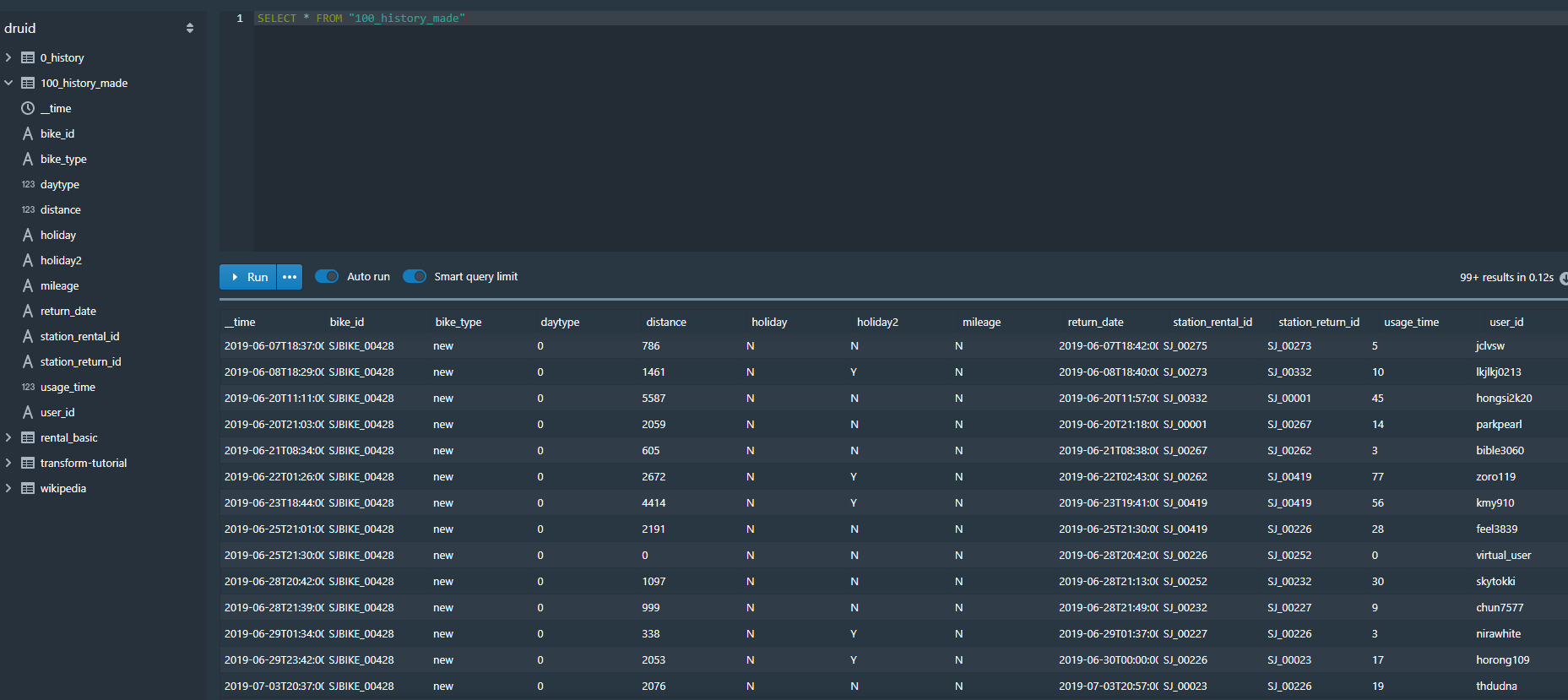
ingestion 성공
'Druid > Project' 카테고리의 다른 글
| 데이터 파일 python으로 드루이드에 자동으로 올리기 (0) | 2020.09.18 |
|---|---|
| [Druid] Writing an ingestion spec - rollup이 된 data (0) | 2020.09.17 |
| 파이썬으로 드루이드 ingestion해보기 (0) | 2020.09.14 |
| Linux에서 Linux로 파일 옮기기 (scp) (0) | 2020.09.02 |
| [Druid] 어울링 데이터 ingestion (0) | 2020.09.02 |
'Druid/Project' Related Articles
more
